RevisitDownload free

A project inbox for your next ideas

Capture the thought.
Let your agent continue.

Revisit keeps prompts, ideas, and useful text organized by project—then shares the right workspace with Claude Code, Codex, or any MCP client.

  • Free to use
  • Local on your Mac
  • Pro is A$9.99 AUD, once
  • macOS 14+
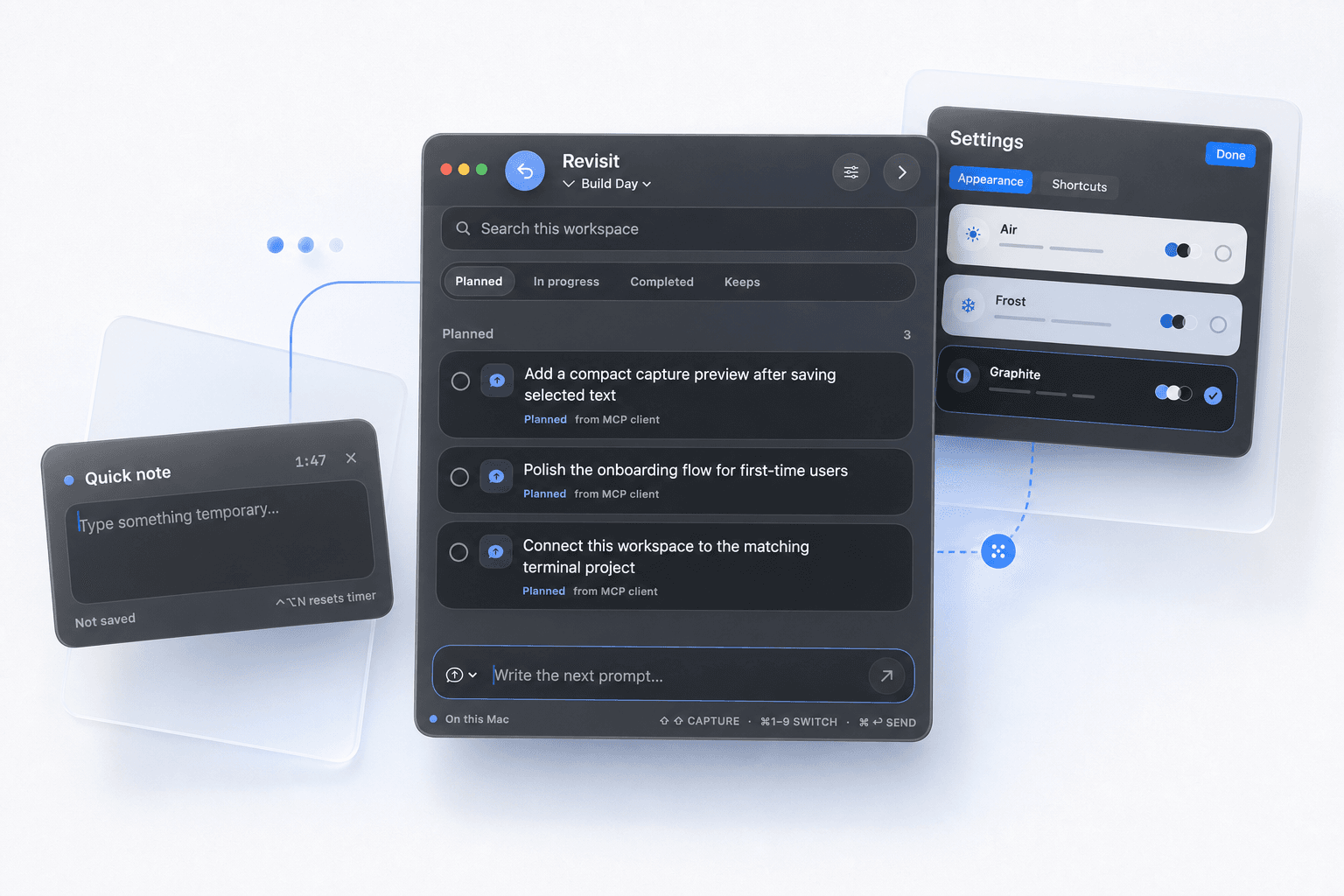
A composed Revisit product scene with the project board, a quick note, and appearance settings floating together
Capture without leaving your workOne workspace for every passing thought

What Revisit actually does

Your thoughts stop getting lost between projects.

Save the idea when it appears. Revisit remembers where it belongs and makes it available when you—or your agent—are ready.

1

While you work, select anything useful.

We should add project-aware search⇧ ⇧

Capture anywhere

Keep the thought without breaking focus.

Select text or open the capture panel from any app. Revisit saves it quietly—without pulling you into another window.

2
PlannedProject searchNew landing page
In progressMCP handoff
Completed Quick note
KeepsUseful answer

Organize by project

Know what is next, active, and done.

Every workspace has a simple board for Planned, In progress, Completed, and the captures you want to Keep.

3

“Open the planned list and start the next feature.”

Revisit moved “Project search” to In progress

Continue through MCP

Your agent starts with the right context.

Ask your coding agent to read a workspace, take the next task, and update its status as the work moves forward.

One shared project memory

Works with the coding agent you already use.

Revisit exposes project workspaces through MCP. Your agent can find a matching workspace, read every planned capture, add new ideas, and keep the board current while it works.

Connect your agents with Revisit Pro
RevisitPortfolio workspace
4 planned
MCP

Claude CodeRead · capture · update

CodexRead · capture · update

>_

Any MCP clientUse the same workspace

Everything close at hand

Designed around the moments ideas arrive.

Project workspaces

Keep every app, client, and half-built idea in its own calm place.

A queue that moves

See what is Planned, In progress, Completed, or worth keeping.

Instant recall

Search every capture, prompt, answer, and project from one shortcut.

Your shortcuts

Double Shift and double Option out of the box. Pick your own with Revisit Pro.

Two-minute note

Pin a tiny temporary thought on screen. It disappears without becoming clutter.

MCP built in

Let Claude Code, Codex, and other MCP clients read and update the right queue. Included in Revisit Pro.

Private by default

Your ideas stay on your Mac.

Revisit stores your work in a plain local file. There is no account, analytics SDK, or server receiving the prompts and answers you save.

Free, with a Pro licence

Free to keep. A$9.99 AUD to hand it to your agent.

The app is free and stays free: capture, workspaces, the board, search. Revisit Pro adds the two things that need a licence—the MCP connection your coding agent talks to, and shortcuts you pick yourself. Every install gets seven days of Pro to try it.

Revisit

Free · macOS 14+

Freeno account, no expiry
  • Capture selected text anywhere with ⇧⇧
  • Unlimited local project workspaces
  • Planned, In progress, Completed, and Keeps
  • Search, quick notes, and sticky notes
  • Automatic updates, forever

We use your address to email you about new Revisit releases, and for nothing else. Every email has an unsubscribe link.

Revisit Pro

One-time licence · 3 Macs

A$9.99 AUDonce, not per year
  • Everything in the free app
  • MCP connection for Claude Code, Codex, and others
  • Shortcuts you choose yourself
  • Three Macs on one licence

Secure checkout by Stripe. One payment, not a subscription. Your key arrives by email and unlocks the app you already have—there is nothing new to download.

Good to know

A few quick answers.

Who is Revisit for?

Anyone moving between projects, apps, ideas, or AI agents. That includes developers, designers, students, and people who have only just started building.

What do I get for free, and what needs Pro?

Capture, workspaces, the board, search, quick notes, and sticky notes are free and always will be. Revisit Pro unlocks the MCP connection to your coding agents and lets you choose your own shortcuts. Every install starts with seven days of Pro, so you can try the part that costs money before paying for it.

How does the MCP connection work?

Revisit includes an MCP server that lets compatible coding agents read, create, and update captures in a workspace you choose. It is part of Revisit Pro, and connecting Claude Code, Codex, or Claude Desktop takes one click in Settings.

Is Revisit Pro a subscription?

No. It is a single payment that covers three of your Macs, and the app keeps working offline once activated. Activation sends a hashed identifier for your Mac and nothing else — never your notes.

Does Revisit send my notes anywhere?

No. The Mac app stores its data locally and has no sync or analytics service.

Which Macs are supported?

The current release supports Apple silicon Macs running macOS 14 or newer.

Why does it need Accessibility permission?

macOS requires that permission to read text you deliberately select in another app and to support global shortcuts.